Technology and Science22 May, 20262 min read
Google Rolls Out Disco Custom Icons for Pixel Launcher With AI-Generated Styles
This article is an automated aggregation of coverage from news outlets. Our editorials offer in-depth analysis curated by the NewsCord team.
Official Disco icon pack rolling out for Pixel Launcher on Pixel phones. Sameer Samat, Android head, confirmed Disco rollout.

Pixel Disco Icons Arrive
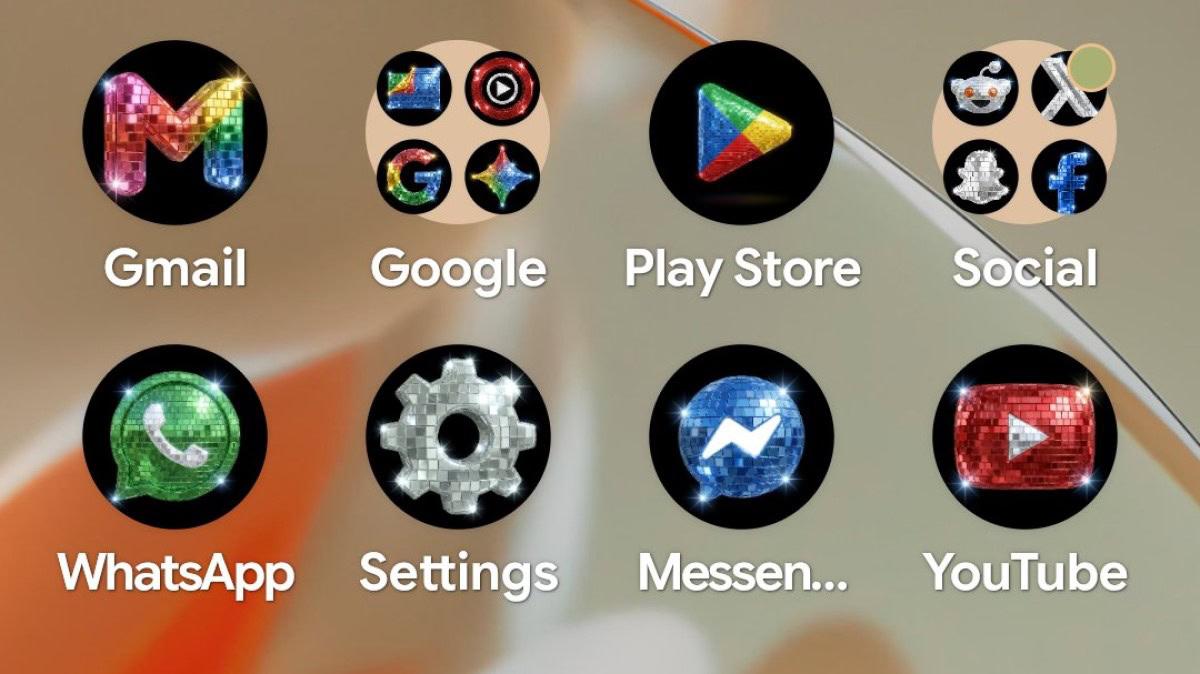
Google rolled out a new “Disco” custom icon style for Pixel Launcher, turning app icons into a disco ball look on a black background as part of Pixel’s custom icon feature.
“Your wish is our command. Disco icons available on Pixel as of today … Are y’all sure you still want this?”
Android ecosystem head Sameer Samat confirmed the rollout, and TechCrunch quoted his post: “Your wish is our command. Disco icons available on Pixel as of today … Are y’all sure you still want this?”

The feature is delivered through Pixel’s custom icon customization system, which lets users choose AI-generated styles rather than only matching icon colors to wallpaper and theme.
Droid Life said the “Disco” option appears after a user long-presses the home screen, chooses “Wallpaper & style,” selects “Icons,” and taps the Create button, then uses the “Download” button to apply the pack.
9to5Google added that the “Disco” effect arrived alongside other styles including “Scribbles,” “Cookies,” “Stardust,” “Easel,” and “Treasure,” which it said are powered by AI generation.
From Spotify Backlash to Google
TechCrunch said Google joined the disco ball icon trend after Spotify released a temporary disco ball app icon to celebrate its 20th anniversary and drew “extensive online backlash (and a bit of praise for those who like a little kitsch!).” Zamin.uz reported that Spotify’s glittery icon drew heavy criticism (and some praise) from users, and it said Google decided to “join the joke” by announcing special themed icons for Android users. Android Authority described the disco icon fad as “mired in controversy” and said reactions to Spotify’s temporary disco ball icon were “mixed, at best,” before noting Google’s decision to “lean in” to the trend.
In the same coverage, Android Authority pointed to a Twitter/X origin story involving Pixly’s Race Johnson creating disco-ified icons and Android head Sameer Samat teasing an official icon pack. TechCrunch also quoted Google’s reminder to users that the Spotify change was temporary, including the streamer’s line: “Alright, we know glitter is not for everyone,” which TechCrunch attributed to Spotify.
How It Works and What’s Next
Droid Life said the “Disco” style is accessed by long-pressing the home screen, selecting “Wallpaper & style,” then “Icons,” and using the Create menu to tap “Disco” before hitting the “Download” button. Zamin.uz said the new icons are available through the custom icon customization feature on Pixel smartphones, and it described that users previously could only match icon colors to their wallpaper theme. 9to5Google said the icon styles are powered by AI generation and that each icon gets an AI-generated recreation with customizations such as different color palettes.
Android Authority framed the update as a custom style for the Pixel Launcher rather than a traditional icon pack, and it described the preset system as responsible for Google’s ability to deploy the update “in record time.” 9to5Google also noted that Pixel phones recently lost their latest theme pack, based around Spongebob, and said they “have yet to get a new addition,” while asking whether users will use the new “Disco” pack.